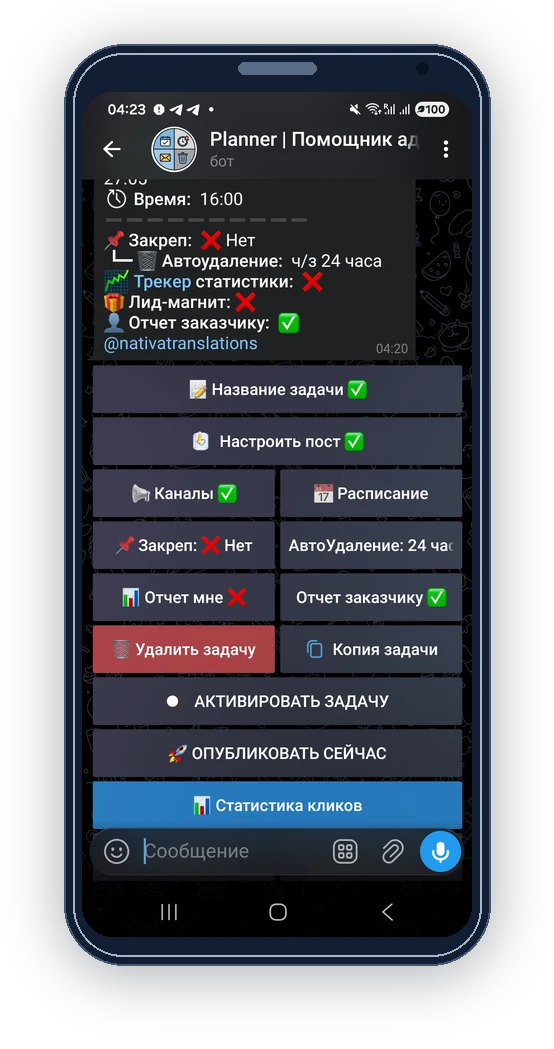
Telegram auto-posting bot

Offer to pin a Telegram post or keep it published

When an advertising task is activated, the client notification can suggest pinning or keeping the post without automatic deletion if those options are missing.

Placement options

What you can do

  • Show relevant options to the advertiser assigned to the task.
  • Open a prepared request to the administrator through Use tip when the contact is available.
  • Keep the discussion tied to the intended placement.

How to set it up

  1. Create the task and assign the intended advertiser.

  2. Check pinning and automatic deletion settings before activation.

  3. Activate the task. Its client notification can suggest pinning when pin duration is zero, and keeping the post when automatic deletion is enabled.

  4. Agree on any requested option and price with the client, then update the task settings and check the next publication.

Requirements and limits

  • The suggestion is sent when you activate the task. It does not mean that the advertiser has seen the published post.
  • ‘Use tip’ opens a prepared private message only when the administrator has an available username.
  • The advertiser still needs to agree on the terms with you and pay as arranged. The suggestion does not automatically renew a placement or send renewal reminders.

Inside the bot

Check pinning and automatic deletion settings before activation.

Check pinning and automatic deletion settings before activation.

Questions and answers

Does accepting a tip automatically charge the client?

It opens a request to discuss with the administrator. Confirm payment and settings through your usual process.

Will both options always be shown?

No. Suggestions depend on whether pinning and automatic deletion are already configured.