Telegram auto-posting bot

Prepare Telegram Business reply drafts with AI

Draft replies to advertising inquiries in Telegram Business using available conversation context and saved materials. Review the result and keep control of the final answer.

AI reply assistant

What you can do

  • Draft answers to recurring placement questions.
  • Use saved wording, templates and information you supply.
  • Edit drafts and decide which conversations the assistant should handle.

How to set it up

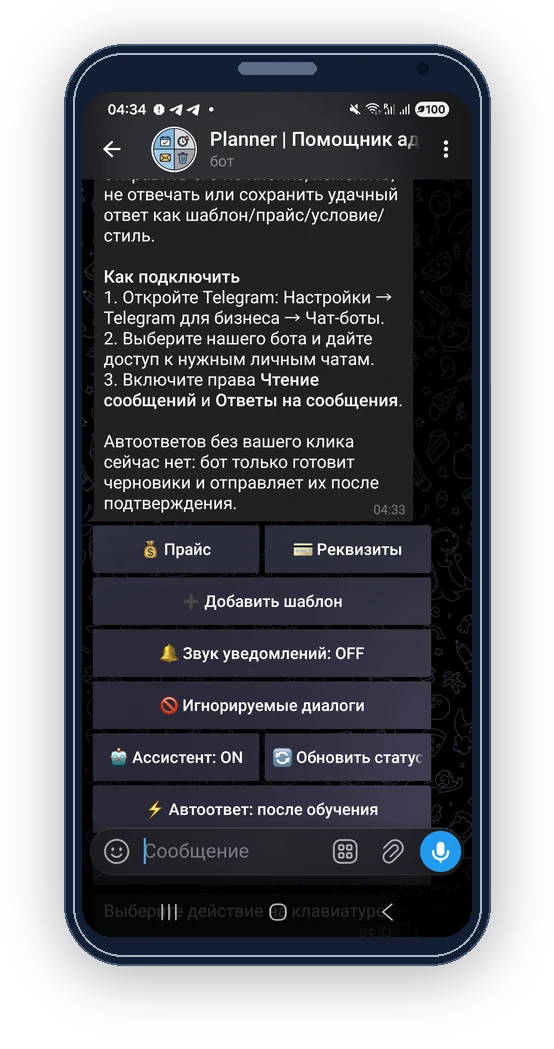
  1. In Telegram, open Settings, Telegram Business and Chatbots. Connect the bot with the read and reply permissions you intend to use.

  2. In ReklamaPlanbot, open ‘Settings’ and ‘AI Secretary’, then prepare your templates and current price or placement information.

  3. Review each draft against the conversation, available dates, price and agreed terms.

  4. Edit the draft and choose ‘Send’ when it is ready. Update your saved information when your terms change.

Requirements and limits

  • The assistant prepares drafts for you to review and send. Automatic replies are not currently available.
  • The assistant does not check current prices, available dates, payments or bookings for you. It does not automatically create or activate a publication schedule.
  • AI output can be inaccurate or incomplete. Telegram Business access depends on the features available to your account.

Inside the bot

In ReklamaPlanbot, open ‘Settings’ and ‘AI Secretary’, then prepare your templates and current price or placement information.

In ReklamaPlanbot, open ‘Settings’ and ‘AI Secretary’, then prepare your templates and current price or placement information.

Questions and answers

Will it negotiate and book placements itself?

No. Confirm prices, dates and task settings yourself; treat its output as a draft.

Does it need current price information?

Yes. Keep supplied materials current and verify that the draft used the correct information.